

Dune HD AV1 4K
A compact 4Kp60 HDR10+ media player with AV1 support for your local media collection.
More product photos
Key features
- Modern S905W2 media processor with AV1 and 4Kp60 HDR10+
- The media player uses the modern S905W2 media processor. It ensures excellent picture quality, supports 4Kp60 HDR10+ decoding and output, includes the new AV1 video codec, and has…
- Full 4Kp60 HDR10+ video support
- The media player supports both 4Kp60 HDR10+ video decoding and 4Kp60 HDR10+ video output. The media player can downscale 4K content to any resolution and upscale any content…
- AV1 video codec
- The media player supports the new AV1 video codec, which helps to get up to 50% video quality improvement without increasing video bitrate (or requires up to 50%…
- Excellent performance
- The media player has a modern CPU (four 1.8 GHz ARM A35 cores) and GPU (Mali G31). This gives increased performance in comparison with the previous generation of…
- 2 GB operating memory
- 2GB of operating memory allows smooth operation of the media player.
- 16 GB flash memory
- 16GB flash memory provides enough space for system needs and applications, and also gives room for internal storage which can be used for any purpose. For example, you…
Explore all features
Modern S905W2 media processor with AV1 and 4Kp60 HDR10+
- The media player uses the modern S905W2 media processor. It ensures excellent picture quality, supports 4Kp60 HDR10+ decoding and output, includes the new AV1 video codec, and has good performance overall.
Full 4Kp60 HDR10+ video support
- The media player supports both 4Kp60 HDR10+ video decoding and 4Kp60 HDR10+ video output. The media player can downscale 4K content to any resolution and upscale any content to 4K resolution. YouTube 4K HDR is supported.
AV1 video codec
- The media player supports the new AV1 video codec, which helps to get up to 50% video quality improvement without increasing video bitrate (or requires up to 50% lesser bitrate for the same video quality). This new video codec is already used by YouTube and will be increasingly important for compatibility with various video services and content sources.
Excellent performance
- The media player has a modern CPU (four 1.8 GHz ARM A35 cores) and GPU (Mali G31). This gives increased performance in comparison with the previous generation of affordable Dune HD media players.
2 GB operating memory
- 2GB of operating memory allows smooth operation of the media player.
16 GB flash memory
- 16GB flash memory provides enough space for system needs and applications, and also gives room for internal storage which can be used for any purpose. For example, you can store media files in the internal storage and even share them to the local network via the built-in SMB file server.
HDR10+
- The media player supports not only HDR technology, but also more advanced HDR10+ technology. In conventional HDR technology, the brightness range is set at the beginning of the film and does not change during the film, so completely dark and completely bright scenes may have insufficient detail. In the HDR10+ technology, the brightness range can vary from frame to frame, so the maximum picture detail is provided even in scenes that contain only dark or only light elements.
Extended support for multichannel audio
- The media player can decode all audio formats (up to Dolby TrueHD Atmos and DTS X) to multichannel PCM (up to 7.1 channels). The media player can output bitstream passthrough for DD/DTS audio formats (5.1 channels).
Android 11
- For Android applications, the media player uses a modern Android version 11. This increases system performance and gives improved compatibility with the newest Android apps.
Other key advantages over competitors
Automatic framerate/resolution switching
- The media player can automatically switch output framerate and resolution to match the played content. This helps to ensure absolutely smooth video playback and use the best way for video resolution upscaling (resolution upscaling by the media player or by the TV).
Flicker-free framerate/resolution switching
- Dune HD media players implement its own advanced flicker-free approach for automatic framerate and resolution switching, which performs video mode switching before the start of file playback (rather than after). Most other media players perform video mode switching after the start of file playback, which causes unpleasant flickering.
Multichannel DSD and other advanced music formats
- You can play music in various advanced formats, including multichannel FLAC, WavPack, APE, ALAC and even multichannel Super Audio CD (SACD). SACD music files, encoded using the advanced DSD audio codec, are supported in all popular formats (ISO, DFF, DSF), including both stereo and multichannel files, including files which use the DST compression. Multichannel DSD files can be output to HDMI as multichannel PCM. Stereo DSD files can be output to HDMI and S/PDIF as stereo PCM.
Optimized OS
- Since the media player does not have Google Android TV certification, the operating system in the media player is optimized to eliminate the unneeded burdens and limitations. In particular, the media player does not create unneeded Android folders on connected HDDs, system performance is not decreased by Android indexing files on the connected HDDs, and so on.
Dune HD Android Playback Accelerator technology
- This unique technology intellectually manages the resources of Android OS to minimize the influence of Android OS on the media playback engine and ensure smooth and high-quality video and audio playback.
Linux-based Dune HD OS
- The media player runs a unique hybrid OS which consists of a Linux-based Dune HD OS (to ensure stable operation and smooth media playback) and Android OS (to support Android applications), which run simultaneously.
Dune HD ecosystem
- Based on open Dune HD SDK and APIs, various TV-optimized applications, plugins, extensions, GUI skins, collection management solutions, integrations with home automation systems are available via official Dune Store, 3-party vendors, and from the huge user’s community.
Dune HD UI
- The famous Dune HD UI, developed and polished during more than 12 years, specially optimized for the use on TV screens and operation via a standard remote control, tuned for the best possible usability, makes it easy and convenient to use the media player.
Dune HD movies organizer and movies encyclopedia
- “My Collection” function organizes a user’s movie collection into a nice looking catalog. A comprehensive movies encyclopedia provides the information about hundreds of thousands of movies with detailed descriptions, posters, cross-links between movies and persons, trailers, direct links to online video services, etc. The advanced file browser automatically recognizes movies.
Dune HD mobile app
- The unique Dune HD mobile app (Dune Control) for iOS and Android mobiles devices provides full access to all functions of Dune HD media player in a very convenient and powerful way. It fully replaces the standard IR remote control, allows browsing and choosing the media content directly on your mobile device (the menu shown on the mobile device mirrors the menu shown on the TV screen), and includes Now Playing section for convenient media playback control.
Smart home
- The media player provides the powerful IP Control interface and has a lot of options for integration into Smart Home and Home Automation systems, such as Control4 and Crestron.
Proven history of software updates during a very long period
- Dune HD is known for its reputation to listen to user’s feedback and provide software updates for many years. For example, for some old models, software updates with additional functions have been provided for more than 10 years already. This is possible due to the unique “single code base” approach, which means that firmware for all Dune HD models is based on the same software (continuously developed and improved according to user’s feedback).
Other key features
Wi-Fi 2T2R MIMO with two antennas
- Two Wi-Fi antennas and Wi-Fi 2T2R MIMO technology give improve wireless performance and a better wireless range, when using a wireless connection to the home network.
Built-in Bluetooth 5
- The built-in Bluetooth interface allows you to easily connect various remote controls, wireless keyboards, mice, joysticks, audio speakers, headphones, headsets and other devices. The modern Bluetooth version 5 provides good performance and compatibility.
IR control
- The media player has the built-in IR receiver and can be controlled by IR commands. This means you can use a 3-party programmable or learnable remote of your choice to control the media player, or integrate the media player with your smart home via IR. For example, you can integrate the media player with a smart speaker by using an IR emitter device controlled by the smart speaker.
IR remote with a plenty of buttons
- The included IR remote controls provides a lot of buttons for convenient and easy access to various media player functions. In particular, it includes dedicated PLAY/PAUSE, SUBTITLES, AUDIO TRACKS and many other buttons.
Front panel display
- During file playback, the display shows the current playback position. Also it can show the current time. Display mode can be adjusted in the menu.
Specifications
Hardware
| Media processor | Amlogic S905W2 with AV1 and 4Kp60 HDR10+ |
|---|---|
| Operating memory | 2 GB |
| Flash memory | 16 GB |
| Ethernet | 10/100 Mbit/s |
| Wi-Fi | 802.11b/g/n/ac, Dual Band 2.4+5 GHz, 2T2R |
| Bluetooth | 5.x |
| USB ports | 2x USB 2.0 host |
| Micro SD slot | Micro SD slot |
| HDMI output | HDMI 2.1 up to 4Kp60 HDR / HDR10+ |
| Analog A/V output | 3.5mm minijack (composite video + stereo audio) |
| S/PDIF output | Optical S/PDIF |
| Front panel display | multi-segment LED display HH:MM |
| IR receiver | Built-in IR receiver, supports Dune HD IR codes and Google IR codes |
| Antennas | 2x internal Wi-Fi + BT antennas |
| Remote | IR remote |
| Case | Plastic |
| Cooling | Passive |
| Dimensions (W x H x D) | 105mm x 20mm x 105mm |
| Power input | 5V DC IN (2A) |
| Power supply | External, DC 5V (2A), AC 100-240V |
Video
| 4K video decoding | Yes, up to 4Kp60 HDR10+; 4K content can be downscaled to 1080p or lower output resolution |
|---|---|
| 4K video output | Yes, up to 4Kp60 HDR10+; any content can be upscaled to 4K output resolution |
| Video decoding | AV1, VP9 profile 2, H.265 (HEVC), H.264 (AVC), VC1, MPEG4, MPEG2, MPEG1 |
| HDR formats | HDR10+, HDR10, HLG |
| HDR mode (SDR/HDR) switching | manual and automatic (according to played content) |
| Framerates | all standard framerates including 23.976, 24.0, 25.0, 29.97, 30.0, 59.94, 60.0 |
| Framerate and resolution switching | manual and automatic (according to played content) |
| Video upscaling and downscaling | Yes |
| 3D video support | Side-by-Side, Top-and-Bottom (TV requires manual switching into 3D mode) |
| Video file formats | MKV, MPEG-TS, MPEG-PS, M2TS, VOB, AVI, MOV, MP4, QT, ASF, WMV, ISO, movie folder structures |
| BD playback | Lite (direct video playback without menu) |
| DVD-Video playback | Lite (direct video playback without menu) |
Audio
| Bitstream passthrough | bitstream passthrough of DD and DTS formats (5.1 channels) |
|---|---|
| Decoding of Dolby/DTS formats | multichannel decoding (up to 7.1 channels) of all Dolby/DTS formats (up to Dolby TrueHD Atmos and DTS X) |
| Audio decoding | MPEG-1/2 layer I/II/III, AAC, LPCM, FLAC, multichannel FLAC, Vorbis, WavPack, APE (Monkey’s Audio), ALAC (Apple lossless), SACD DSD (stereo and multichannel), multichannel PCM (up to 7.1), all Dolby/DTS formats (up to Dolby TrueHD Atmos and DTS X) |
| Audio file formats | MP3, MPA, M4A, AAC, WAV, FLAC, Ogg/Vorbis, WavPack, APE (Monkey’s Audio), ALAC (Apple lossless), SACD ISO (stereo), SACD DSF (stereo), SACD DFF (stereo), AC3, DTS, DTS-WAV |
| PCM audio output | 48 kHz |
Other Features
| Subtitle formats | SRT (external), SUB (MicroDVD) (external), text (MKV), SSA/ASS (MKV, external), VobSub (MP4, MKV, external SUB/IDX), PGS (ISO, TS, MKV) |
|---|---|
| Online subtitles | Automatically download subtitles from Internet |
| Picture file formats | JPEG, PNG, BMP |
| Photo viewer functions | Slideshow, transition effects, picture rotation, zoom, view playlist, repeat, shuffle |
| Playlist file formats | M3U, PLS, CUE |
| Playlist functions | Build playlist from selected folders and files, build playlist from selected playlist files, view playlist file, view current playlist, quickly jump to next/previous or selected playlist item, repeat, shuffle, playlist of photo files, playlist of audio files, playlist of video files, mixed playlist of audio and video files |
| SMB client | Browse SMB servers/shares, manually connect to SMB share, directly access (read-write) and play files (SMB v1/2/3) |
| NFS client | Browse NFS servers/shares, manually connect to NFS share, directly access (read-write) and play files |
| SMB server | Share connected storage devices (internal HDD, USB HDD) and internal flash memory to local network via SMB protocol (SMB v1/2/3) |
| iOS and Android mobile apps | Control the media player via the powerful Dune Control mobile application |
| IP control | Use the built-in IP Control interface to integrate the media player into Smart Home and Home Automation systems (such as Control4 and Crestron) |
OS and Apps
| OS | Linux-based Dune HD OS + Android 11 |
|---|---|
| OS kernel | 64-bit |
| Android apps | 32-bit |
| Support for HDDs larger than 16 TB | Yes |
| Filesystems | FAT16/FAT32 (read-write), EXT2/EXT3/EXT4 (read-write), NTFS (read-write), exFAT (read-write), HFS/HFS+ (Mac OS Standard/Extended) (read-only), BTRFS (read-write) |
| Widevine DRM | L3 |
| Google Android TV certification | No |
| Netflix certification | No |
| Compatibility with Android apps and streaming services | Varies across particular apps and services, no guaranteed compatibility (no official Android TV certification, no official certifications by particular streaming services); the primary function of this media player is Hi-End media playback from HDD or NAS, support for Android apps and streaming services is additional non-primary functionality without guaranteed compatibility |
In the box
- Media player x1
- IR remote x1
- Batteries AAA x2 (Optional)
- Power supply 5V 2A x1
- HDMI cable x1
- Quick installation guide x1
Dune HD interface
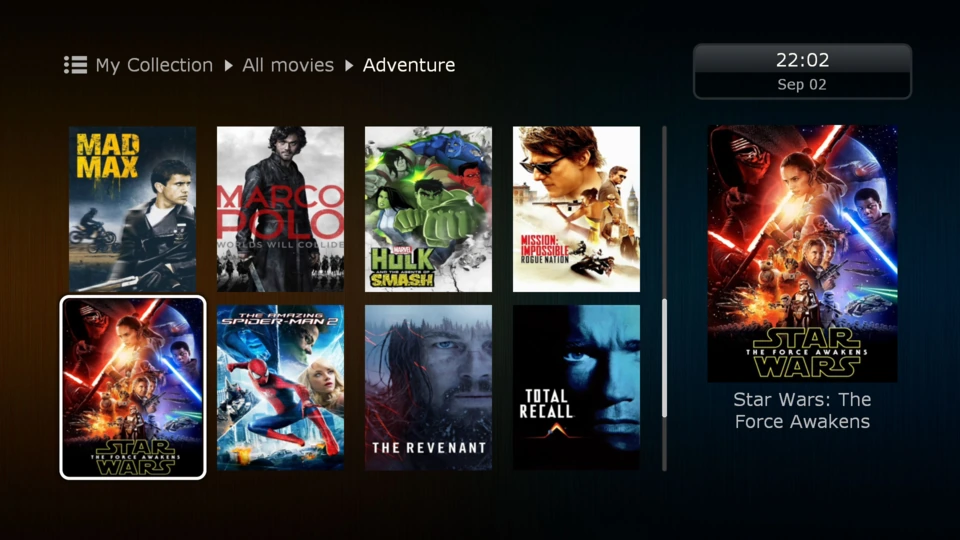
Your collection, easy to browse
Organize movies and TV series with cover art and media details. Browse files on your PC or NAS, and control playback with the Dune Control mobile app.
Explore the interfaceAll interface functions
Famous Dune HD interface: convenient and smooth interface optimized for TV screens and remote controls, developed and polished during many years; now even more smooth than before and with additional features
Direct network access: directly browse and play files stored on PC or NAS in local network via SMB or NFS
My Collection: organize your movies and TV series into a nice-looking and convenient catalog
Movies catalog: find any movies, even those which are not in your collection, via common unified catalog with detailed movie descriptions, trailers and cross references between movies and persons
Direct links to online video services: quickly start watching a movie via connected video services directly from the movies catalog
Automatic movie recognition: easily view movie descriptions and find related movies when browsing your movies in the file browser
Advanced file manager: easily manage (copy, move, delete, rename, organize, sort) files directly in the file browser
Favorites menu: easily access your favorite items: files, folders, movies, persons, applications, etc
Auto start: configure which favorite item to open automatically on player boot
Recent menu: see what you played recently and easily resume the playback or switch between latest items
TV browser: watch TV channels (Internet TV, when configured) via a convenient Dune HD TV Browser
Extended EPG: when watching TV channels, see extended EPG information automatically downloaded from the Internet (when available for a TV channel)
Links to Movies catalog from Extended EPG: easily view movie descriptions and find related movies, watch trailers, watch movies via connected online video services
Playlists: build playlists from selected items and folders or load playlists from files
Customizable user interface: enjoy a variety of user interface skins, customization options and Jukebox applications
Jukebox applications: use various 3-party Jukebox applications to organize your media collection into a convenient user interface
Dune HD applications: easily install various applications and plugins with additional functionality from Dune Store or third parties
Plugins and extensions: full support for Dune HD PHP plugins API, Dune HD skins, dune_folder.txt mechanism
Android applications: install any Android applications via App Store or from APK file, and launch them directly from Dune HD interface
Background playback: play music, radio, TV channel or video in background while navigating through any menus of Dune HD interface or even when using any Android applications
Internet browser: view Internet websites on your TV, including video playback directly on web sites (via Chrome web browser)
Setup & compatibility
Firmware and compatibility notes
Some of the listed features may not be available in the factory firmware and may require to install a firmware update.
The support for particular media formats and codecs and playback functions may depend on the used application; some formats and codecs and playback functions may be supported only in specific applications and may require to install a specific application.
Compatibility of the player with particular media content (files, streams, etc) may depend on specifics of media content encoding, specifics of the configuration of the player and player-connected equipment, and other factors; compatibility of the player with arbitrary media content is not guaranteed.
Compatibility of the player with particular applications (Dune HD plugins or Android applications) may depend on specifics of the application, particular usage scenario, and other factors; compatibility of the player with arbitrary applications is not guaranteed.
Compatibility of the player with particular equipment (A/V equipment, network equipment, storage devices, etc) may depend on particular equipment model, specifics of equipment installation, specifics of the configuration of the player and equipment, and other factors; compatibility of the player with arbitrary equipment is not guaranteed.
Product images may be imprecise and may have some differences in comparison with the real look of the product.
Accuracy of the information is not guaranteed; the information is subject to change w/o notice.


